|
<< Click to Display Table of Contents >> WinLoG Field Assistant Tab |
  
|
|
<< Click to Display Table of Contents >> WinLoG Field Assistant Tab |
|
This- tab is used to upload data for WinLoG Field Assistant to the FTP site.
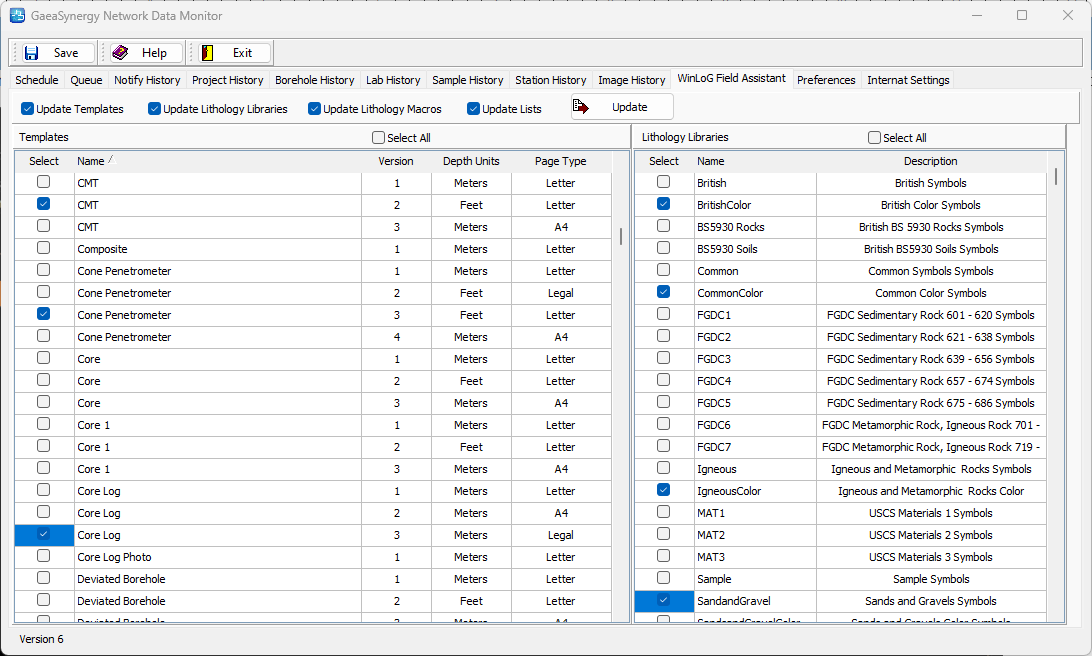
The following data can be uploaded and/or updated to the FTP site for use in WinLoG Field Assistant:
Templates: To upload/update the templates check the Update Templates box and a list of templates in the main network database will be shown. Select the templates to update by using the checkboxes next to the template name.
Lithology Libraries: To upload/update the lithology libraries check the Update Lithology Libraries box and a list of lithology libraries in the main network database will be shown. Select the lithology library to update by using the checkboxes next to the library name.
Lithology Macros: To upload/update the lithology macros check the Update Lithology Macros box. All of the lithology macros in the main network database will be updated.
Lists: A variety of lists can be uploaded.updates from the main network database by checking the Update Lists box. These lists include borehole symbols, sample descriptors, well materials, country codes, drilling methods, and custom descriptors.
After the data to be uploaded has been selected, click on the Update button to perform the upload.