|
<< Click to Display Table of Contents >> Preferences Tab |
  
|
|
<< Click to Display Table of Contents >> Preferences Tab |
|
The Preferences tab is used to control the settings for the service.
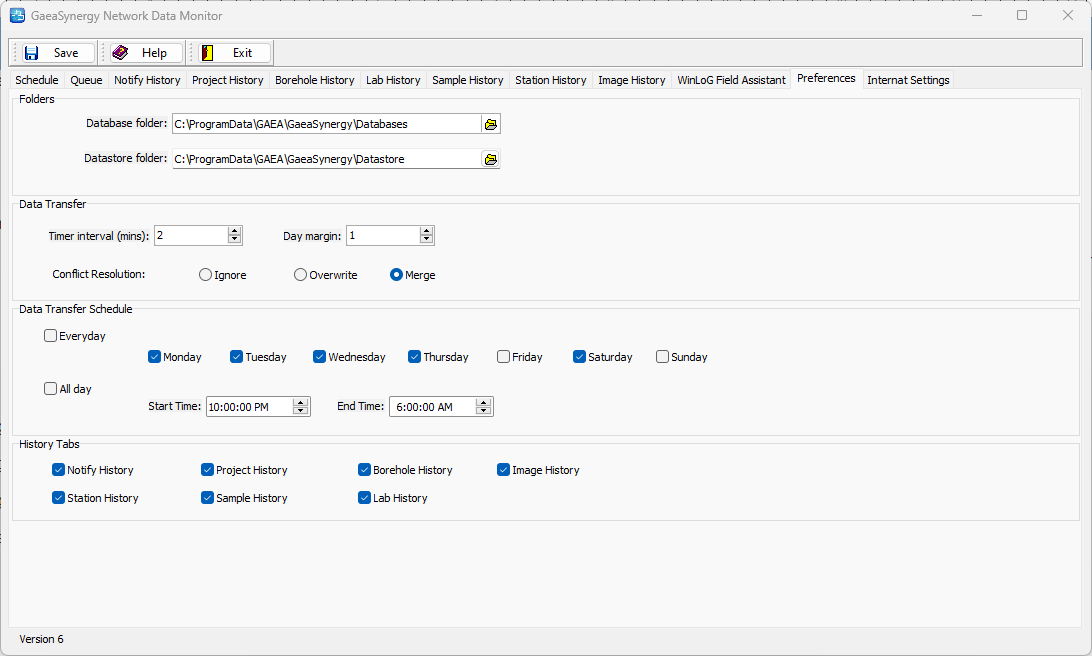
The following can be specified on this tab:
Folders
Database Folder: This is the folder used to databases for GaeaSynergy. It should be the same as specified in Preferences for GaeaSynergy.
Datastore Folder: This is the folder used to store data for GaeaSynergy. It should be the same as specified in Preferences for GaeaSynergy.
Data Transfer
Timer Interval: This is the timer interval in minutes between updates of the service. The service will check for EDIs and send/receive notifications at this interval.
Day margin: This is the allowable margin in days for a sample to be collected without being considered non-compliant. For example, is the margin is 2 days the sample must be collected within 2 days of the date required to not be non-compliant.
Project Conflict Resolution: When a project is being imported from the FTP site, this is how a conflict is handled when the project already exists in the main database.
Data Transfer Schedule
Everyday: Check this to perform data transfers every day or uncheck it to select the days to perform, data transfers.
All day: Check this to perform data transfers all day or uncheck it to specify the start and end times for data transfers.
History Tabs
Notify History: Check this box to show the Notify History tab.
Project History: Check this box to show the Project History tab.
Borehole History: Check this box to show the Borehole History tab.
Image History: Check this box to show the Image History tab.
Station History: Check this box to show the Station History tab.
Sample History: Check this box to show the Sample History tab.
Lab History: Check this box to show the Lab History tab.