|
<< Click to Display Table of Contents >> Properties Tab |
  
|
|
<< Click to Display Table of Contents >> Properties Tab |
|
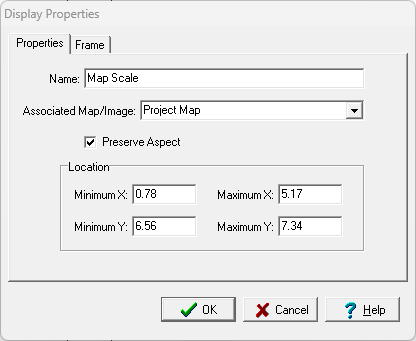
The following information can be edited on the Properties tab:
Name: This is the name of the data element.
Associated Map/Image: If the element is a Map Scale the map or image associated with the map scale can be selected. If the element is not a map scale this is not shown.
Preserve Aspect: Check to preserve the aspect ratio of the data element when it is added to a project document.
Minimum X: This is the lower boundary of the display in page coordinates.
Maximum X: This is the upper boundary of the display in page coordinates.
Minimum Y: This is the left boundary of the display in page coordinates.
Maximum Y: This is the right boundary of the display in page coordinates.