|
<< Click to Display Table of Contents >> GIS |
  
|
|
<< Click to Display Table of Contents >> GIS |
|
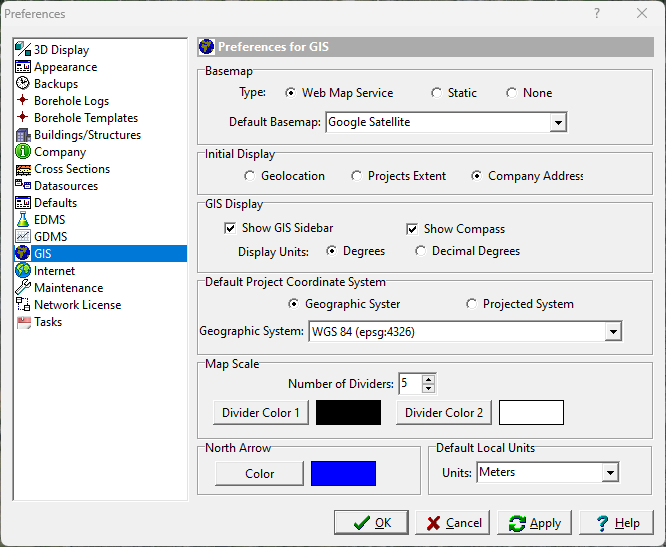
The following can be edited in the GIS category:
Basemap
Type: Select the type of basemap to use for the default. The type of basemap can be a web map service, static, or none. If there are no static basemaps currently in the database, then the static button will be disabled,
Default Basemap: This is the basemap to use for a web map service or static basemap. The list of basemaps available will depend on the type of basemap.
Initial Display
This is used to select the initial display when the application is started. It can either show an area around where you are located based on your Internet IP address, an area showing the extent of all of your projects, or an area based upon the company address specified on the Company tab.
GIS Display
Show GIS Sidebar: Check to show the GIS sidebar.
Show Compass: Check to show the GIS compass.
Display Units: This is used to select the units for the current cursor location shown in the status bar at the bottom of the display.
Default Project Coordinate System
Geographic System: Select this to specify in geographic coordinates.
Projected System: Select this to specify in projected coordinates.
Coordinate System: This is used to select the geographic or projected coordinate system.
Map Scale
Number of Dividers: This is the number of dividers in the scale bar.
Divider Color 1: Click this button to change the color of the first divider in the scale bar.
Divider Color 2: Click this button to change the color of the second divider in the scale bar.
North Arrow
Color: Click this button to change the color of the North arrow on the map.
Default Local Units
Units: This is the default local units to use for projects and the map scale.