|
<< Click to Display Table of Contents >> Rectangles |
  
|
|
<< Click to Display Table of Contents >> Rectangles |
|

After a rectangle has been created or selected for editing the form below will be displayed.
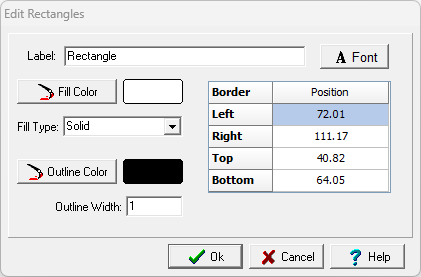
The following information can be displayed on this form:
Label: This is an optional label for the rectangle.
Font: Click this button to change the font for the label.
Position: This is the position of the rectangle on the map.
Fill Color: Click this button to adjust the color of the fill.
Fill Type: This is to select the fill style.
Outline Color: Click this button to adjust the color of the outline of the circle.
Outline Width: This is the thickness of the outline.